How to register to sign up directly for events
To book yourself onto events you first need to register as a Beacon user. This is a one-off process and the following instructions will guide you through the process. It may help if you download and print these instructions before proceeding.
⚠️ If you have used Beacon before, your device may remember old details — please do not use these.
Before registering you will need to have your membership number. If you do not have this then you should contact our Beacon Administrator
Step-by-step instructions
- On the menu bar in the Meols (Southport) website click on Beacon > sign-in and this will open a new tab in your web browser for the Beacon sign-in page. You can now switch between tabs to read these instructions or work with Beacon.
- In the Beacon tab, click on Register for a membership account - ignore the email and password boxes, as illustrated below.
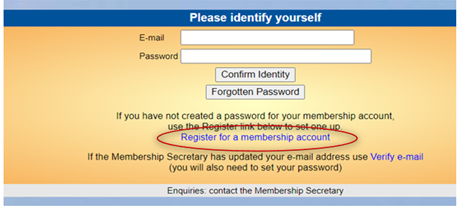
Complete the registration form as follows:
- Enter your details exactly as shown on your membership form: this is a one-off requirement
- Confirm your email address
- You will receive an email from Beacon: click the link in that email
- Return to the sign-in screen and you will see a message confirming that your email has been verified
- Sign in by entering your email address and password then click Confirm Identity
- Join the Test Group
- Click u3a Groups and then find A Beacon Test Group in the list of available groups
- Join the group. We can then guide you through the next stages to join events
- Contact our Beacon Administrator if you need assistance.
Helpful reassurance
- You only need to register once
- After this you simply need your email address and password to sign in to Beacon
- No payment details are involved
Please note you will not be able to join all groups / events online. If this is not available, please contact the group leader via the website or at a meeting.